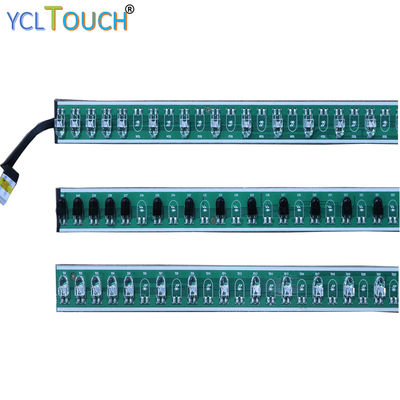
The board at a glance
An infrared touch PCBA module — the product class in the components family, where modules run from 15-inch desktop frames to 500-inch spliced builds — carries four functional blocks: the emitter array, the receiver array, the scanning and interpolation electronics, and the USB interface. Everything a buyer feels as "touch quality" — accuracy, latency, multi-touch honesty — is decided by how these four blocks are engineered together, which is why modules are specified by response class and points, not by board colour.
Emitters and receivers: the optics
Along two edges, infrared LEDs fire brief pulses across the surface in sequence; along the facing edges, photoreceptors sample the arriving light. The arrays look simple — rows of near-identical components — but their pitch sets the raw spatial sampling of the whole system, and their drive pattern sets its immunity to ambient light. Modulated pulses, sampled synchronously, let the receiver distinguish its own beams from sunlight and room lighting; that modulation scheme is a large part of what separates a frame that works in a bright atrium from one that only works in a demo room. When a specification sheet says an IR panel suits industrial control, this block is most of what it means.
Scanning and interpolation: the mathematics
The controller scans the grid continuously, building an occlusion map: which beams are blocked, and by how much. A fingertip blocks several beams partially, and the firmware interpolates the centroid to a fraction of the beam pitch — the origin of the 32768 × 32768 coordinate space this catalogue states. Multi-touch tracking lives here too: the firmware maintains touch identities across scans, which is how crossing hands do not swap cursors. Response figures in this catalogue — 5 ms class on specified modules, under 10 ms typical — are the scan-plus-processing budget of this block, and they are why a datasheet's response line deserves more attention than its points line, a theme our touch points guide develops.
The USB block: manners at the border
The interface section presents the module to the host as a standard HID digitizer on USB 2.0 full-speed and draws its 5V from the same connector. Good border manners — clean enumeration, sane report rates, no proprietary host stack for basic operation — are what make the module a component rather than a commitment. The behaviours that do need vendor tooling (calibration storage, segment mapping on spliced builds) are described in the USB interfaces article.
What fails in the field
Post-mortems on returned modules repeat a short list. Connector and cable damage outnumbers electronic failure by an embarrassing margin — strain relief is a reliability feature. Contaminated optics — dust film on the window strips — degrades gain gradually and is cured by cleaning, not replacement. Power starvation through tired hubs masquerades as intermittent electronic failure. Genuine array failures cluster at the corners, where handling damage concentrates during installation. The practical conclusion for builders: handle the board like the optical instrument it is, design its service swap to be easy, and most "electronics problems" will never occur. The anatomy lesson ends where it began — the intelligence is on the board, but the reliability is in the integration.
Specifying a module for your own build
If you are buying PCBA modules to integrate — rather than finished frames — the specification conversation has four questions that matter more than price per board. Geometry: the module set must match your frame's active area and profile channel; emitter pitch and segment lengths are physical facts, confirmed against your extrusion drawing. Response class: match the module's scan budget to the application — a whiteboard tolerates what a rhythm game cannot — and treat the stated millisecond class as a system figure to verify on your glass, not a component promise. Host behaviour: confirm the enumeration and calibration-storage model against your operating system and your service model; a module whose calibration lives on a host you re-image monthly is a recurring ticket, designed in at purchase. Support horizon: modules are the long tail of a product; ask how spares are supplied and for how long, while the programme is young and the asking is easy. Builders who specify on these four questions find that module sourcing becomes boring — the same board, arriving on schedule, behaving identically — which is the highest compliment a component can earn. The board's job is to disappear into your product; the specification's job is to make sure it can.
Reading a module datasheet without being fooled
Module datasheets reward a sceptical reading order. Start at the footnotes: operating conditions, test glass, ambient light — the headline figures were measured somewhere, and the footnotes say where. Then check which figures are typical and which are guaranteed; a response time listed as typical is a description of a good day. Cross-check the points figure against the scan architecture: true simultaneous tracking of many points at low latency is a processing budget, and a module that claims the maximum of both at the minimum price is telling you something about its footnotes. Finally, weight the unglamorous lines — operating temperature range, connector type and rated cycles, ESD tolerance — because field life is decided there. None of this requires distrust; it requires reading the document as an engineer rather than as a shopper. The modules in this catalogue state their class plainly — 5 ms class on specified builds, under 10 typical, 20 points standard — and plain statements are what a sceptical reading is for: they survive it. Specify from the footnotes upward and the board you integrate will behave, in your product, the way it behaved on the bench.
From board to system: the integrator's summary
Stand back from the board and the system view is simple: optics that sample, firmware that interprets, an interface that behaves, and an integrator who respects all three. The PCBA module is where a touch programme's promises are kept or broken in miniature — its arrays decide what can be sensed, its firmware decides what is believed, its connector decides how often anyone thinks about it again. Choose it on evidence, integrate it with discipline, and document it like a component with a decade ahead of it. The frame, the glass and the software will each have their own stories; the board's story should be that there is nothing to tell.
For completeness, a word about what the module is not. It is not the accuracy of the finished product — that emerges from the module, the frame geometry, the glass and the calibration together, and blaming or crediting the board alone misleads both ways. It is not the product's industrial design, its software experience, or its price; it is the sensing core around which those are built. Keeping the categories separate is what lets each be engineered well: the board team optimises scan and signal, the frame team optimises fit and finish, the software team optimises the feel. The module's highest achievement is to make its layer of the stack forgettable — present in every touch, visible in none.